
- All
- Product Name
- Product Keyword
- Product Model
- Product Summary
- Product Description
- Multi Field Search
Views: 0 Author: Site Editor Publish Time: 2026-08-05 Origin: Site


Digital design and physical manufacturing meet at a critical juncture known as stitch-level plot files. This crucial bridge dictates how perfectly a vibrant digital mockup becomes a tactile reality on your factory floor. Investing in commercial equipment requires a seamless, error-free workflow stretching from initial digitizing interfaces directly to the hardware controller. When production interfaces misinterpret a complex design file, manufacturing facilities inevitably face ruined backing fabric, frequent thread breaks, and severe operational downtime. We will thoroughly evaluate how standard commercial embroidery formats govern overall production speed, exact hardware compatibility, and crucial uptime metrics. You will learn to confidently navigate the intricate mechanical nuances of both DST and DSB file structures. Ultimately, this operational knowledge will empower you to dramatically optimize file conversion pipelines across all your automated manufacturing setups.
DST (Tajima) and DSB (Barudan) are coordinate-based punch files that translate visual designs into strict X/Y machine movements and action commands (trim, stop, jump).
Not all robotic tufting machine software processes legacy file formats with the same efficiency; path optimization varies significantly by vendor.
Evaluating tufting machines requires auditing their native controller compatibility with DST/DSB files to avoid third-party conversion bottlenecks.
Production scaling relies on standardized file creation protocols to mitigate hardware wear, thread breaks, and backing fabric damage caused by poor stitch density mapping.
Engineers faced a unique challenge when automating textile manufacturing. They needed a reliable way to communicate rapid movements to heavy hardware. Traditional robotic systems often use standard CNC G-code. G-code excels at driving continuous milling paths. However, it struggles to process thousands of micro-stops required for punching yarn. The industry needed a faster, more specialized language.
Robotic textile manufacturing ultimately co-opted commercial embroidery formats. These legacy formats already possessed the perfect mechanical vocabulary. They instruct hardware on exact grid positioning. They handle rapid needle cycling efficiently. This engineering choice bridged a major gap between simple plotting and complex textile fabrication.
Many operators confuse coordinate files and graphic files. DST and DSB files do not contain image data. They do not store pixels, vectors, or color palettes. Instead, they contain strictly sequenced coordinate instructions. They carry hardware-agnostic trigger commands. You can think of them as digital sheet music. The file tells the equipment where to move and when to punch.
Visual vector files like SVG and AI remain purely theoretical. They outline shapes on a digital canvas. They lack the mechanical vocabulary needed to drive physical servo motors. You must convert these graphic files into coordinate-based punch files before manufacturing begins.
Standardizing on these universal formats protects your production line. It prevents facilities from being locked into proprietary design ecosystems. Many hardware brands try to push their own exclusive software platforms. These proprietary ecosystems often carry high recurring licensing fees. Utilizing universal formats breaks this dependency.
It allows you to mix different hardware brands on the floor. You gain the freedom to scale operations smoothly. You can hire digitizing agencies worldwide because everyone understands standard formats. This standardization guarantees long-term operational flexibility. It simplifies training for your production staff.
The Tajima DST format dominates the current manufacturing landscape. Industry professionals appreciate its ubiquity. It offers near-universal compatibility across modern equipment. Most controllers can read a standard DST file instantly. This formatting standard ensures reliable data translation.
However, the DST architecture has notable limitations. It lacks native color data storage. The file only registers machine stops and trims. It does not know if a section requires red or blue yarn. Operators must perform manual color mapping at the interface. Furthermore, DST files have absolute scaling limitations. You cannot resize a DST file by 50% at the controller without destroying the underlying stitch density.
The Barudan DSB format presents slightly different structural nuances. It varies primarily in its header data construction. DSB files sequence internal commands differently than DST files. Some legacy controllers prefer this specific sequencing logic.
You should standardize on DSB based on specific controller origin requirements. Certain hardware brands process Barudan jump commands more efficiently. It prevents the needle from dragging across the primary backing. Understanding your specific controller architecture dictates your format choice.
Format Specification | DST Architecture | DSB Architecture |
|---|---|---|
Industry Ubiquity | Extremely High | Moderate to High |
Color Data Storage | None (Relies on stop commands) | None (Header variances only) |
Maximum Stitch Length | 12.1 mm | 12.7 mm |
Scaling Flexibility | Rigid (Requires re-digitizing) | Rigid (Requires re-digitizing) |
Facilities should establish a strict decision lens for procurement. You must mandate native file reading capabilities. Any prospective equipment must read standard files seamlessly. You want to avoid proprietary intermediary conversion steps. Intermediary software often corrupts stitch spacing. It scrambles origin points during the conversion process. Native compatibility ensures the most reliable production output.
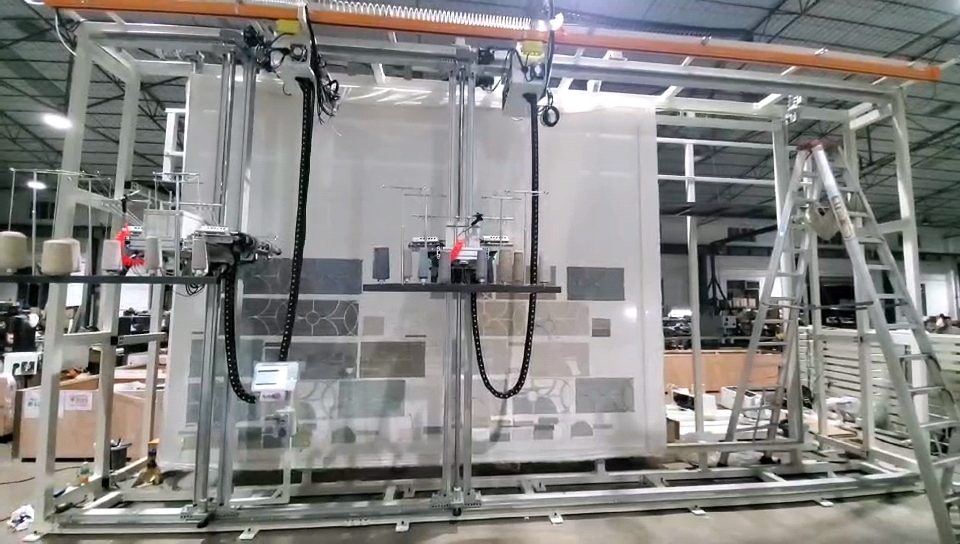
Digitizing software performs a highly complex translation process. It converts raw artwork into optimized DST DSB tufting software outputs. The software calculates the exact mathematical distance between every single yarn insertion. It determines how dense the yarn pile should be. This core functionality forms the backbone of any automated textile operation.
You must evaluate software based on path optimization capabilities. Excellent programs automatically route the most efficient needle path. Poorly optimized files force the machine to travel erratically across the frame. Efficient routing reduces unnecessary travel time. It significantly decreases mechanical wear on servo motors and drive belts. Smart optimization groups color zones logically to minimize thread trims.
Software must flawlessly handle action command mapping. It translates design layers into specific mechanical actions. The program embeds triggers directly into the final code.
It parses the vector boundary into a fill region.
It calculates the optimal angle for yarn insertion.
It dictates automatic thread cutting at zone borders.
It inserts jump stitches for non-punching travel movements.
It controls automated pile height changes if the hardware supports it.
Compliance and security remain crucial considerations. Ensure your software licenses are strictly valid for commercial use. Pirated or consumer-grade software often lacks industrial output features. Output files must be unencrypted. Unencrypted files allow for multi-machine brand environments. Encrypted files tie you to a single hardware manufacturer.
Selecting robust robotic tufting machine software protects your entire workflow. It guarantees crisp design translation. It prevents the hardware from executing dangerous, unoptimized movements during high-speed runs.
Translating digital designs into physical textiles carries distinct operational risks. Stitch density mapping frequently causes the most severe issues. Standard embroidery utilizes very thin thread. Textile yarn is significantly thicker and heavier.
Porting standard embroidery density settings into heavy yarn files creates immediate problems. The needles pack the yarn too closely together. This operational mistake destroys the backing fabric. The intense friction shreds the primary canvas. It ruins the material and wastes valuable production time. Operators must aggressively reduce stitch density when digitizing for thick yarn applications.
Jump stitch overload represents another common hurdle. Unoptimized files generate excessive jump commands. Every jump forces the machine to halt its punching cycle. It triggers the automatic scissors to trim the yarn. Excessive trimming leads to thread break sensor false-positives.
It creates unnecessary mechanical downtime.
It wears out the scissor blades prematurely.
It leaves messy yarn tails across the back of the fabric.
It confuses the controller's sequence tracking.
Scale and origin point mismatches cause significant frustration. Software origin points often misalign with physical frame boundaries. A digital file might assume the center is zero. The hardware might read the bottom-left corner as zero. This mismatch drives the needle block directly into the metal frame.
You must address the operator skill gap immediately. Modern visual interfaces make operators complacent. They rely solely on colorful screen previews. Operators must learn to read raw coordinate behaviors. They need to recognize when a file commands an impossible physical movement. Training them to analyze the raw data prevents catastrophic hardware collisions. It elevates them from machine watchers to true technical troubleshooters.
Procuring new Tufting Machines requires rigorous interoperability testing. You cannot evaluate hardware independently from file processing. Begin with a comprehensive controller assessment. Evaluate the onboard computer interface closely. Does it offer clear visual path previews for uploaded files? Operators need to see the exact needle path before initiating a high-speed run.
Workflow testing remains an absolutely critical procurement step. Never rely on the vendor's pre-loaded demonstration files. These files are perfectly optimized to hide hardware flaws. You must test your own complex files on their equipment.
Bring a highly dense, multi-color file to the demonstration. Force the machine to process challenging geometric shapes. Verify the actual run times against the software estimates. Watch how the controller handles error codes and thread breaks during complex sequences.
Assess the available data transfer protocols on the equipment. How do files move from the design room to the factory floor? Legacy systems rely on physical USB transfers. USB drives get lost, corrupted, or infected with malware. Modern equipment should support robust network connectivity. Wi-Fi or Ethernet integration allows seamless, centralized file management.
Finally, examine the vendor support matrix carefully. Legacy file parsing requires occasional updates. Factor in the availability of regular firmware updates. Good manufacturers continuously refine how their controllers interpret old file formats. Ongoing firmware support ensures your tufting machines adapt to future software enhancements.
The efficiency of any automated textile operation is directly constrained by file quality. Software-hardware translation serves as the ultimate bottleneck for production speeds. You cannot achieve high output volumes using poorly optimized punch files. Excellent physical hardware cannot compensate for erratic coordinate instructions.
Buyers must view hardware and digitizing software as a single integrated ecosystem. They are not separate purchasing decisions. A misaligned ecosystem leads to constant operational friction and material waste. Standardizing on universal formats ensures long-term agility and vendor independence.
We highly recommend a mandatory pre-purchase file audit. Demand that vendors demonstrate a live production run using your specific, buyer-provided files. Verify the needle paths, density handling, and error logging firsthand. This proactive validation guarantees your investment will perform flawlessly on the active production floor.
A: Yes, but specific parameters must be heavily modified. Standard embroidery software defaults to tight stitch lengths and high densities. You must adjust these settings to account for heavy yarn thickness. You also need to modify jump commands to match the specific mechanics of your textile guns compared to traditional embroidery needles.
A: The DST format does not store color hex codes or visual palettes. It only stores mechanical "stop" or "color change" trigger commands. Operators must manually assign physical yarn colors to corresponding needle stops at the machine controller before starting the run.
A: Vector files are purely mathematical representations of images used for visual design. DST and DSB are mechanical punch files. They dictate exact hardware motor movements on an X/Y grid. Vector files cannot drive machinery directly; they must be digitized into coordinate formats first.
A: Proprietary software may offer better auto-pathing or native color previews specifically tailored for heavy yarn. However, it can create significant vendor lock-in. Supporting standard universal formats ensures operational flexibility across mixed-brand hardware environments on your factory floor.


